Now that we have the formula to calculate any one of PV, I, S and n from any of the other three it is quite easy to construct an annuity calculator along the same lines as the savings plan calculator given in Chapter 4.
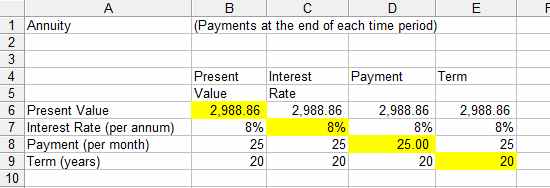
First enter the text as shown in Figure 2 and the following formulas
=PV(B7/12,B9*12,-B8) in B6 =RATE(C9*12,C8,-C6,0)*12 in C7 =PMT(D7/12,D9*12,-D6,0) in D8
and
=NPER(E7/12,E8,-E6,0)/12 in E9
As in the case of the savings plan entering the three appropriate values into the spreadsheet gives you the fourth in the cell coloured yellow.
The annuity calculator
Formula summary
FV
FV(I,n,S,PV,type)
S
PMT(I,n,PV,FV,type)
n
NPER(I,S,PV,FV,type)
I
RATE(n,S,PC,FV,type,guess)
For an ordinary annuity type is set to 0 or omitted and FV is often 0.
Spreadsheets take the hard work out of calculations, but you still need to know how to do them. Financial Functions with a spreadsheet is all about understanding and reasoning, using a spreadsheet to do the actual calculation.
Understanding Percentages Percentages are something familiar to us all - but they present many pitfalls that need to be avoided.
Interest Simple and Compound We explore the idea of borrowing money for a specified rate of interest or earning interest on an investment. The ideas of Present and Future Value PV and FV are introduced.
Effective Interest Rates We explore the idea of the `effective’ annual interest rate and then on to the Effective Interest Rate/Annual Percentage Rate, the much quoted EIR or APR.
Introduction to Cashflow - Savings Plans In the first of three chapters covering the way in which interest rate affects cashflow we explore savings - but first we introduce some general ideas that apply equally to annuities and repayment loans.
Cashflow Continued - Annuities We move on to annuities in the second of three chapters devoted to exploring the way in which interest rate affects
Exploring Repayment Loans Repayment loans are the subject of the last of three chapters which look at the effects of regular cashflows.
Present and Future Values The principles of present and future value apply even if the cash flow is irregular. The calculations are just a matter of breaking down the cash flow calculations into simple steps.
Investment Analysis How is it possible to evaluate investments that generate irregular cashflows? We explore how NPV can be used to make investment decisions.
Advanced Investment Analysis IRR and MIRR The IRR is perhaps the most complicated of the measures of the value of an investment with an irregular cash flow. Understanding exactly what it means is a good step toward making correct use of it.