| Getting To Know WPF |
| Written by Mike James | ||||||
| Thursday, 26 September 2019 | ||||||
Page 3 of 5
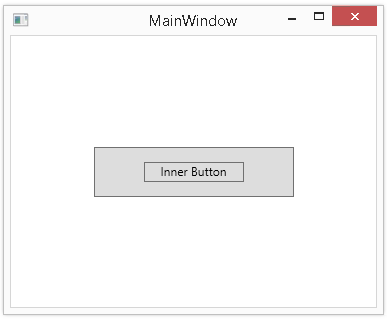
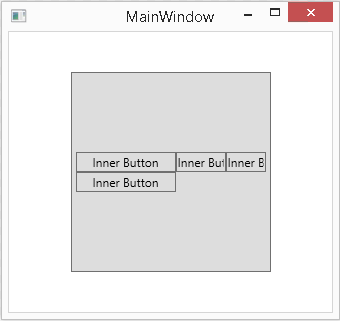
Layout ControlsYou should now be starting to see the basic principles of WPF, but where next? There are lots of features that you could explore but before we look at something more exciting it is worth looking a little closer at the way a user interface is put together. The approach taken by WPF would be familiar to anyone using Java or a number of other similar languages but to the Windows forms programmer it is a little strange. Of course WPF has all of the user interface controls you would expect – buttons, textboxes, drop down lists - and many more advanced controls such as calendar and menu bar. However, at the top of it all is the Visual class from which any element that has a visual aspect is descended. Every visual component has a Content property, which roughly corresponds to what will be displayed. For example, a Window object has a Content property, which specifies what it displays. In some cases all you need to do is set a Content property to an appropriate value. For example, Button1.Content= “Click Me” sets the text the button displays. In all cases the Content property can be set to text or a UIElement such as an Image object. Notice that at the moment the content of any visual component is restricted to be just one other component. In most cases we have to work with a Content consisting of multiple objects. This means we have to worry about how these are arranged, i.e. we have to worry about layout. Layout is dealt with by the Panel objects. Usually we assign a Panel object to the content of a Window and then assign other display objects to the Panel object’s layout hierarchy. Exactly how these objects are arranged depends on the type of Panel object we use. Currently there are five standard layout Panels: Canvas which provides absolute x,y positioning; DockPanel which allows the user to interactively “dock” elements; Grid which provides fixed columns and rows for positioning; StackPanel which arranges objects into a horizontal or vertical line; and WrapPanel which arranges objects as a “flow” in the same way that a web page works. You can see that the Canvas Panel provides the absolute layout that we are accustomed to working with in Windows forms. The WrapPanel is probably the one least like a traditional form. To see this in action simply enter the following XAML (replace the <Grid></Grid> tags): <WrapPanel> Now if you run the project and resize the form you will see that the three buttons move to use the available space – just like the text in a web page. It is also worth realising that this particular object hierarchy has been implement in a rigid and logical way – sometimes with surprising consequences. If you recall, a Content property can be set to any UIElement and this means that you can display a button within a button: <Button Height="50" Width="200" >
Nested buttons If this isn’t mind-boggling enough, you can logically set the content of a button to a Panel and then display lots of other controls within the button. For example: <Button Height="200" Width="200" >
Buttons within buttons... Yes the outer button and any of the inner buttons can still be clicked!

Perhaps this is user interface madness but it is logical and in other contexts even useful. The point isn't to get you to start nesting one control within another but to make clear the logic of how WPF organizes its control classes.
<ASIN:0979372518> <ASIN:0470041803> <ASIN:0672330318> <ASIN:0596526733> <ASIN:1933988223> <ASIN:1590599624> |
||||||
| Last Updated ( Thursday, 26 September 2019 ) |