| Data Compression The Dictionary Way - ZIP |
| Written by Alex Armstrong | |||
| Thursday, 04 June 2020 | |||
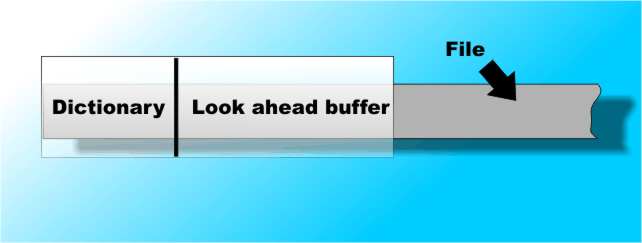
Page 1 of 2 One of the most important lossless forms of compression is the LZW dictionary based method. It turns up in lots of compression utilities - ZIP, Compress, Deflate and in GIF and PNG format files. It is also an important idea in programming and you really do need to know something about how it works - if only to avoid reinventing it from scratch. If you already know something about coding theory you might have heard of Huffman coding and statistical modeling of data etc. You might also think that the data compression methods that we actually use, e.g. when zipping a file, are sophisticated variation on these methods. While it is true that these traditional methods are capable of excellent compression performance they are very slow to implement and not really suitable for real time use. First it is important to distinguish between lossless and lossy compression. In lossy compression you can throw away data and the reconstruction, i.e. the decompression doesn't have to produce an identical copy of the original. In this case it is enough that the decompressed version looks or sounds as good. Good lossy compression is as much about human perception as it is computer science. Lossless data compression doesn't throw away any data - it simply finds the most efficient coding for the data by eliminating redundancies. As already mentioned the theoretical solution to lossless compression is the Huffman code which finds the most efficient coding and stores the data in the smallest number of bits. Good in theory but not so good in practice. Dictionary CompressionThe breakthrough came in 1977 with a theoretical paper by Jacob Ziv and Abraham Lempel. This paper started the whole subject of dictionary compression but, although it was a very theoretical sounding paper, it is amazing that no-one thought of the technique before. It is even possible that someone might have implemented the idea in a practical form before the great breakthrough - it is so simple. So what is dictionary coding? Consider the text of this article as a subject for compression. Instead of giving you each word spelled out letter by letter I could give you the page number and line number of the word in a standard dictionary. You can easily imagine, and a back of the envelope calculation will quickly convince you, that you reduce the amount of data needed to store the text using dictionary references. This is the basis of dictionary compression. The problem is what dictionary should you use? If you use a standard dictionary you can refine the contents of the dictionary to reduce the storage needed to a minimum but there is a hidden cost. To make sense of the data you need the dictionary and the storage needed for it has to be taken into account. You may be able to store this article in only a few KBytes using dictionary coding but you would be less impressed if I then told you that you needed several Megabytes to store the dictionary needed to decode it. The Sliding WindowClearly dictionary coding is tantalising but how to construct the dictionary without incurring large storage overheads is the real problem. This is where "sliding window" dictionary compression comes in. Why not use the document as its own dictionary? Childishly simple isn't it? But what exactly does this mean and how can you implement this in detail? The algorithm described is essentially that introduced in the 1977 paper and is usually known as LZ77 but there are many slight variations on the basic idea. Start off with a buffer that acts as a window onto the file being compresses. Divide the buffer into two portions;
The chunk to the left is used as the dictionary and the chunk to the right is used as a look ahead buffer that holds the section of the file that we are trying to compress. It is assumed that the dictionary portion has already been processed by the compression algorithm. What happens next is that you try to find a match for the string in the look-ahead buffer in the dictionary section. Once you find a match the string in the look-ahead is coded by generating a three-element token:
So for example, the token 32,14,d means that the phrase in the look-ahead buffer matches the dictionary at position 32 and the match continues for 14 characters. The first character in the look-ahead after the match fails is "d". This token is output as the next token in the compressed file which is simply a stream of such tokens generated in compressing the entire file. You should be able to see that this token can be decoded back to the phrase that it represents simply by getting the 14 characters starting at position 32 from the dictionary and adding a letter "d" onto the end. Thus we have succeeded in reducing a phrase of 15 characters to a three element token and this must take less space to store. Notice that as the dictionary is just the first part of the file read into the window there is no need to store a separate dictionary as part of the compressed file. If you imagine for a moment that we are part way though decompressing the file then we already have the portion of the file to use as a dictionary to decode the next token. This avoids the question of how we get the whole thing started with a dictionary portion but more of this after we have finished examining the basic algorithm. |
|||
| Last Updated ( Thursday, 04 June 2020 ) |